
Photoshop pros rejected a strong AI image editor's work in 42.7% of tests
Researchers from Adobe and UC San Diego ran the test on 600 image sets. Specialist tools and better checking helped. Asking the same tool for more attempts didn't.
The short version
- Researchers from Adobe and UC San Diego had professional Photoshop editors judge AI image edits. One strong general AI editor gave no usable result in 42.7% of the test sets.
- Asking it for more attempts didn't fix the problem. Adding specialist tools helped. So did starting each attempt from the original picture and showing the AI reviewer close-ups and measurements.
- The researchers' full system, EditAgent, takes about 10 times as long to run. You can copy its habits today on work that matters, without the software.
What the researchers tested
The paper, on a system called EditAgent, went online on October 29. It is research, and it doesn't announce a product.
The team built a test of 600 image sets covering 30 types of edit. Each set had an original picture and an instruction, plus several edited versions. Professional Photoshop editors marked the usable ones without knowing which tool made which version.
The general AI editor, a strong model that is free to download, failed in 256 of the 600 sets. Most failures were edits to shape and framing, tone and overall image quality. A specialist tool rescued 175 of those 256.
The general AI editor still had its place. In 73.8% of the style and effects sets, every winning picture came from it. In 72.5% of the image quality sets and 66.7% of the shape and framing sets, every winner came from specialist tools.
More attempts didn't close the gap. With several attempts from the general AI editor, the picture picked as best was usable in only 45.2% of sets. With specialist tools in the mix, that rose to 68.2%.
Go back to the original, and show your evidence
Many AI editing tools keep correcting their latest attempt. The researchers compared that with making several attempts straight from the original picture.
A panel of 5 professional Photoshop editors judged 144 samples blind. They preferred the fresh attempts in 102 cases and the repeated corrections in 28, with 14 ties. So fresh attempts won 78.5% of the decided comparisons. They also used at most half the checking steps. The authors say small errors build up when a tool keeps editing its own output.
The second finding is about how results get checked. The system gives its AI reviewer close-ups of the edited area, a map of what changed, plus measurements of color and shape.
With that evidence, an ordinary AI model picked a usable result 81.3% of the time. That beat the best reviewer trained specially for the job. So better evidence beat special training, though the reviewer still missed nearly 1 time in 5.
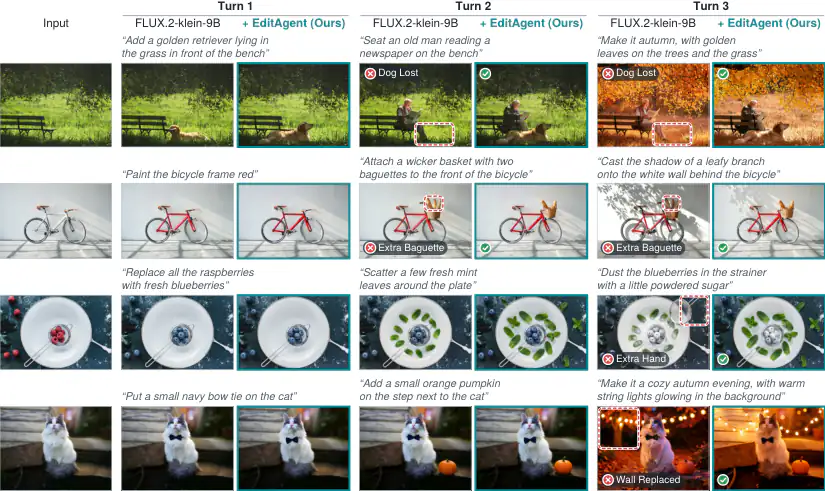
The paper's example pictures show why checking every step matters. In one, a general AI editor loses a dog from the scene during a later change. In another, it adds an extra baguette to a bicycle basket.
The cost, and a way to bring it down
EditAgent takes roughly 10 times as long to run as a single editing model. Its results also depend on which tools you plug into it.
The authors offer one way to bring that cost down. They used about 25.7K approved editing sessions to train single AI tools, which then improved on all 3 standard tests. Training one tool on unchecked output made it worse.
What this means for a marketing team in Indonesia
The test covers images in general. It didn't look at Indonesian brands or campaigns. The lessons still apply if your team or agency partners use AI for product pictures and campaign visuals.
Long briefs carry the most risk. The authors say today's AI editors tend to finish part of a long request and drop the rest without saying so. Someone has to check.
The 10-times run time also points to where this approach fits. It makes sense for a campaign's main visual. It may not make sense for hundreds of quick social posts.
What to do next
- Break long briefs into single changes, and check after each one that earlier changes survived.
- Use general AI tools for style changes. Try specialist or regular editing tools for framing and clean-up.
- When a result is wrong, go back to the original rather than correcting the wrong version.
- Zoom in and compare before and after. Ask your agency partners how they check AI edits.
- Keep a person signing off the final picture.
- Save approved edits with their original picture and brief. They could become useful training material later.