
AI assistants now finish most long computer jobs, but iPhones trip them up
A new test of long, multi-app computer jobs across six platforms found the best AI assistant close behind people overall. The gap is small on Linux and large on iPhones and Macs.

The short version
- A new test asks AI assistants to finish long computer jobs across six kinds of device, then checks the result.
- The best assistant, from Anthropic, completed 68.5% of jobs. People completed 77.3%.
- The gap depends on the device. The top assistants beat people on Linux but fell well behind on iPhones and Macs.
What the test does
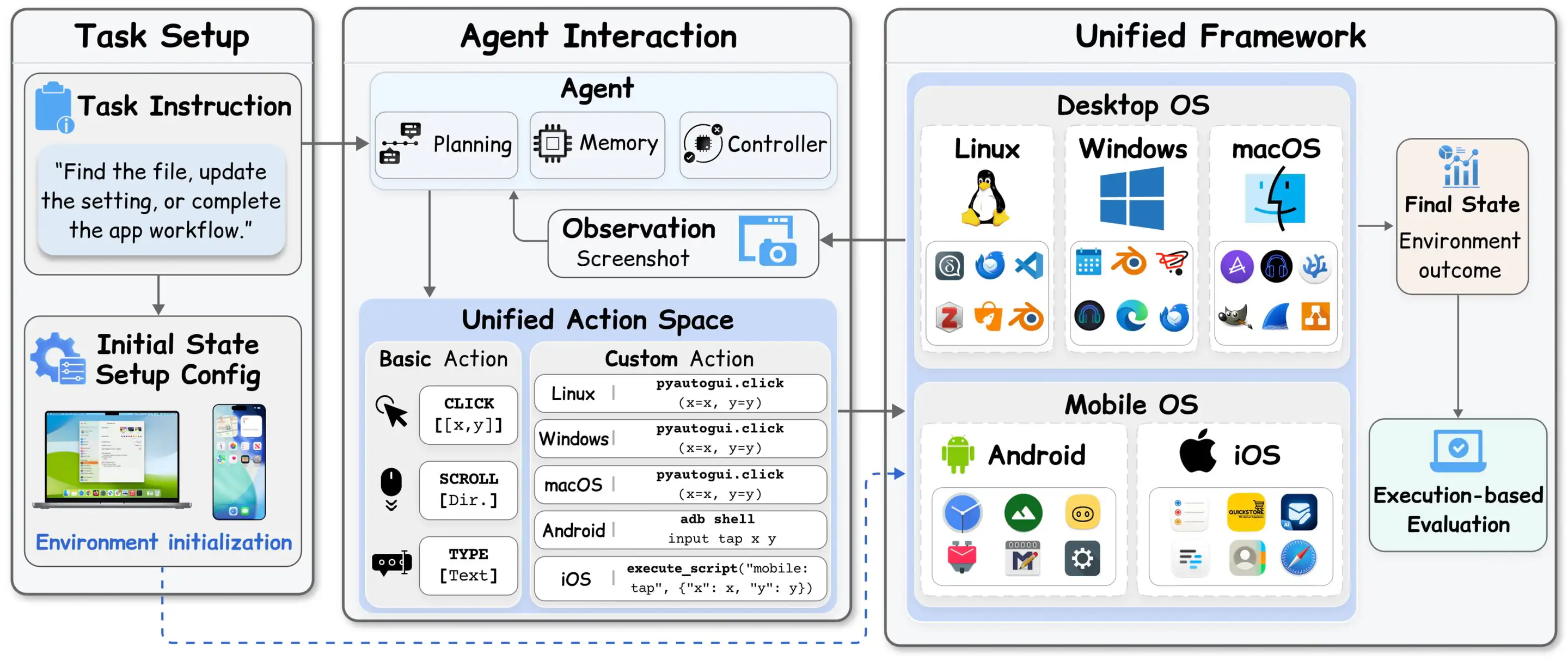
Researchers released the test, called OS-Omni, on arXiv on 25 November. It is meant to look like real work, not a single click.
A typical job might cross several apps and devices. The assistant compares supplies in a shop and adds items to a cart. It updates a budget spreadsheet. It then adds calendar entries on a phone and sends a message with the details. A job counts as done only if every one of those ends up right.
The first release has 48 jobs for each of six platforms: Windows, Ubuntu Linux, macOS, iOS, Android and the web. It adds 12 jobs that need a desktop computer and an Android phone working together. People needed 67.54 steps on average to finish a job. An older and widely used test of this kind needs about 15.0.
What it found
Nine AI models were tested. Anthropic's top model did best on average, at 68.5%. OpenAI's came next at 66.1%, and Google's reached 58.6%. Counting every job equally, the two leaders were nearly tied. The rest were far behind, and the smallest models solved almost nothing.
People scored much the same on every platform, between 72.6% and 83.3%. The AI assistants swung widely:
- Google's model completed 95.8% of Linux jobs but only 18.8% on iPhone.
- Anthropic's model ranged from 85.4% on Linux down to 41.7% on iPhone.
- On iPhone and Mac, the best assistant was still 33.5 and 25.6 points behind people.
On the jobs that use a computer and an Android phone together, Anthropic's model matched people at 83.3%. There are only 12 such jobs, so each one moves the score by 8.3 points. The authors say to read that result with care.
Why the assistants fail
The authors sorted the mistakes into four kinds:
- clicking the wrong button, or misreading a crowded screen;
- losing track of copied information when switching between apps;
- leaving work that looks done on screen but was never saved properly;
- getting stuck on pop-ups and slow apps, or skipping a confirmation step.
The third kind matters most for business. An assistant can look finished while the file or record underneath is wrong.
What it means for your company
On some systems, AI assistants can already do much routine computer work. If your work runs in a browser or on Linux, they can handle a fair share of multi-step jobs.
The test also shows what to measure. A screen that looks finished proves little. The only useful check is whether the saved result is right, which is how this test scores every job.
The weak spots matter for teams that work across a laptop and a phone all day. The assistants stumbled most on iPhones and Macs, and on jobs that cross apps.
What to do
- Start trials on web-based and Linux work, where the assistants do best.
- Test any assistant on the actual devices your staff use, not only on a desktop.
- Judge the end result. Check the saved file or record, not the screen the assistant leaves behind.
- Keep a person in the loop for jobs that cross apps or devices.
- Re-test when new versions of the assistants arrive.